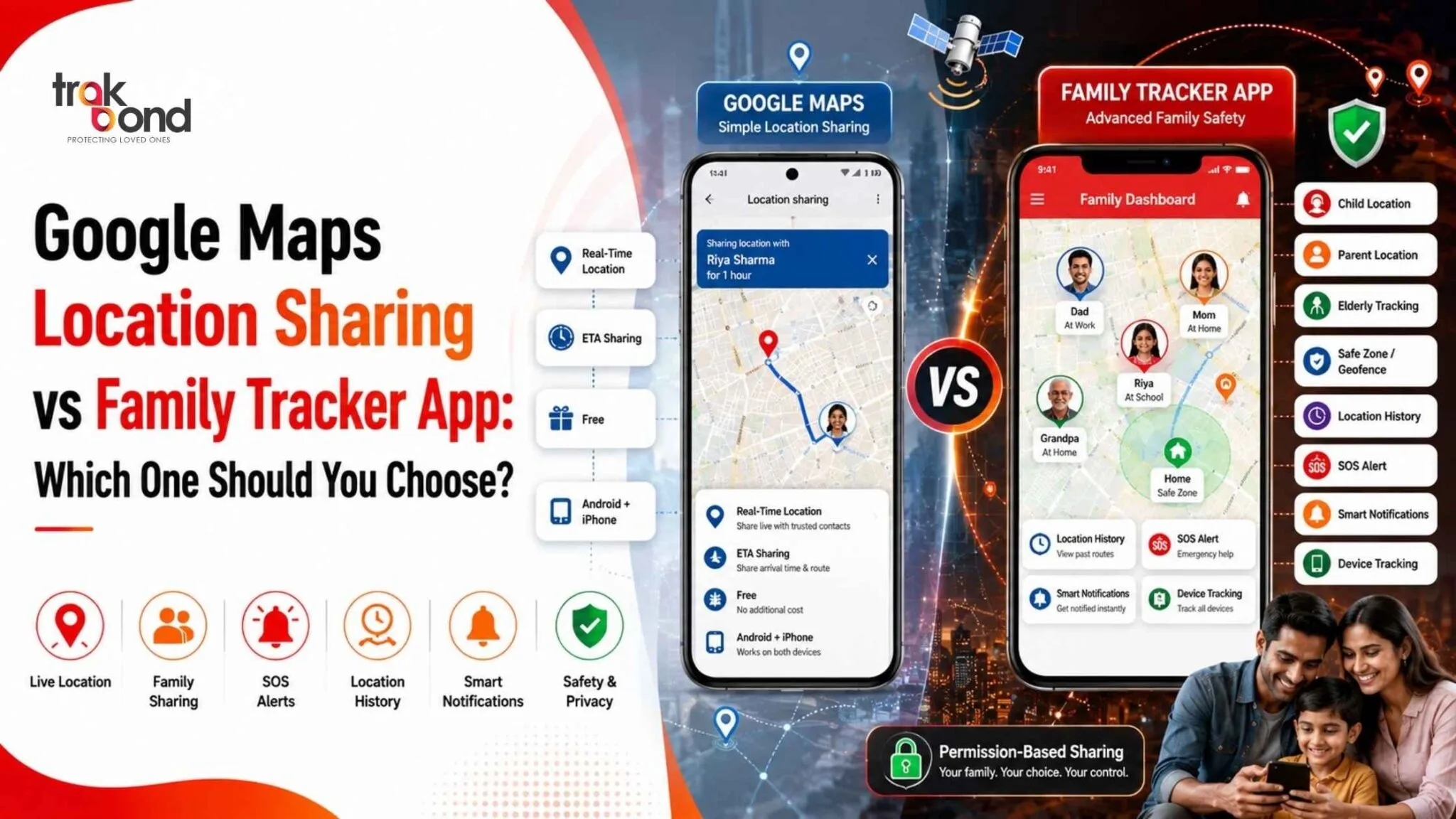
Google Maps Location Sharing vs Family Tracker App: Which One Should You Choose?
Knowing where your loved ones are can provide peace of mind, especially for parents, caregivers, and families with elderly members. While Google Maps Location Sharing is one of the most popular free solutions, many users wonder whether it’s enough or if they should switch to a dedicated family tracker app.
In this guide, we’ll compare Google Maps Location Sharing vs Family Tracker App, highlighting their features, advantages, limitations, and which option is best for different use cases.
What Is Google Maps Location Sharing?
Google Maps Location Sharing is a built-in feature within Google Maps that lets users share their real-time location with selected contacts.
It works on both Android and iPhone and is free to use with a Google account.
Key Features
- Real-time location sharing
- Share location for a fixed duration or indefinitely
- ETA sharing during trips
- Works worldwide
- No additional app required
What Is a Family Tracker App?
A family tracker app is designed specifically for family safety, child monitoring, and location management.
Apps like Trakbond, Life360, and similar solutions offer advanced safety features beyond simple location sharing.
These apps focus on:
- Family safety
- Emergency alerts
- Location history
- Smart notifications
- GPS accuracy
- Device tracking
Google Maps Location Sharing vs Family Tracker App
| Feature | Google Maps Location Sharing | Family Tracker App |
| Live Location | ✅ Yes | ✅ Yes |
| Location History | Limited | Detailed |
| Geofencing | ❌ No | ✅ Yes |
| Arrival Alerts | ❌ No | ✅ Yes |
| SOS Emergency Button | ❌ No | ✅ Yes |
| Family Dashboard | ❌ No | ✅ Yes |
| Multiple Family Members | Basic | Advanced |
| Battery Monitoring | ❌ No | ✅ Yes |
| Child Safety Features | Limited | Comprehensive |
| Lost Phone Tracking | Basic | Advanced |
| Driving Reports | ❌ No | Available in many apps |
| Emergency Notifications | ❌ No | Yes |
Google Maps Location Sharing: Pros
1. Completely Free
There are no subscription charges for sharing your location.
2. Easy to Use
Anyone with Google Maps can start sharing their location in just a few taps.
3. No Extra Installation
Since Google Maps is already installed on most Android phones, there’s no need to download another app.
4. Works Across Devices
Available on Android, iPhone, tablets, and desktop browsers.
Limitations of Google Maps Location Sharing
Although useful, Google Maps wasn’t built specifically for family safety.
Some limitations include:
- No emergency SOS
- No geofencing
- No automatic arrival notifications
- Limited location history
- No family management features
- Limited parental controls
- No battery alerts
These missing features become important when monitoring children or elderly family members.
Benefits of Using a Family Tracker App
A dedicated family tracker app offers much more than simply sharing location.
1. Geofencing
Receive automatic notifications when:
- Kids reach school
- Family leaves home
- Elderly parents arrive safely
- Children visit unexpected locations
2. Real-Time Alerts
Instead of checking the map repeatedly, you receive automatic updates.
Examples include:
- Left school
- Arrived home
- Entered safe zone
- Left office
3. Emergency SOS
Many family tracker apps include a one-tap SOS button that immediately notifies family members during emergencies.
4. Better Location Accuracy
Dedicated GPS tracking systems often provide faster location updates with better optimization.
5. Location History
View where family members have been throughout the day.
Useful for:
- Parents
- Elder care
- Travel monitoring
- Family safety
6. Battery Monitoring
Receive alerts when a family member’s phone battery is running low.
This helps explain why a device may temporarily stop updating its location.
7. Family Dashboard
Track multiple family members from one screen instead of opening separate conversations.
Which Option Is Better for Parents?
If your goal is simply sharing your location with a spouse occasionally, Google Maps Location Sharing works well.
However, parents generally need additional features such as:
- School arrival alerts
- Safe zone notifications
- SOS emergency button
- Location history
- Family dashboard
A dedicated family tracker app is better suited for these needs.
Which Option Is Better for Elderly Care?
Monitoring elderly parents often requires more than just location sharing.
Important features include:
- Emergency alerts
- Battery notifications
- Easy SOS access
- Accurate GPS updates
- Location history
These capabilities are commonly found in family tracker apps but not in Google Maps.
Which Option Is Better for Daily Family Safety?
Choose Google Maps if:
- You only need temporary location sharing.
- You don’t require alerts or safety features.
- You want a completely free option.
- You use location sharing occasionally.
Choose a Family Tracker App if:
- You have children.
- You care for elderly parents.
- You want automatic arrival notifications.
- You need emergency SOS.
- You prefer detailed location history.
- You want advanced family safety features.
Why Many Families Upgrade from Google Maps
Many users start with Google Maps because it’s free and convenient.
As their needs grow, they often look for additional features such as:
- Family safety monitoring
- Smart notifications
- Geofencing
- Emergency support
- Better GPS tracking
- Shared family management
This is where a dedicated family tracker app becomes a more complete solution.
Tips for Safe Location Sharing
Whether you use Google Maps or a family tracker app:
- Share your location only with trusted people.
- Review app permissions regularly.
- Keep GPS enabled when needed.
- Update your app frequently.
- Protect your account with strong passwords and two-factor authentication.
- Turn off location sharing when it’s no longer required.
Final Verdict
Google Maps Location Sharing is an excellent free tool for basic, temporary location sharing between trusted contacts. It’s simple, reliable, and already available on most smartphones.
However, if your priority is family safety, child monitoring, or elder care, a dedicated family tracker app offers significantly more value. Features such as geofencing, emergency SOS, arrival alerts, location history, and multi-member tracking make it a more comprehensive solution for everyday family protection.
If you’re looking for a smarter way to stay connected with loved ones, consider a dedicated family tracking solution like Trakbond, which combines real-time GPS tracking with family-focused safety features.
Frequently Asked Questions (FAQs)
1. Is Google Maps location sharing free?
Yes. Google Maps allows users to share their real-time location with selected contacts at no cost.
2. Can Google Maps send arrival notifications?
No. Google Maps does not provide automatic arrival or departure alerts like many family tracker apps.
3. What is geofencing?
Geofencing creates virtual boundaries around locations such as home or school and sends notifications when someone enters or leaves those areas.
4. Is a family tracker app better than Google Maps?
For families needing advanced safety features like SOS alerts, location history, and geofencing, a dedicated family tracker app is generally the better choice.
5. Can I use both Google Maps and a family tracker app?
Yes. Many users use Google Maps for casual location sharing while relying on a family tracker app for enhanced safety and real-time family monitoring.